
How to build an SEO audit that runs itself (and knows when not to send the report)

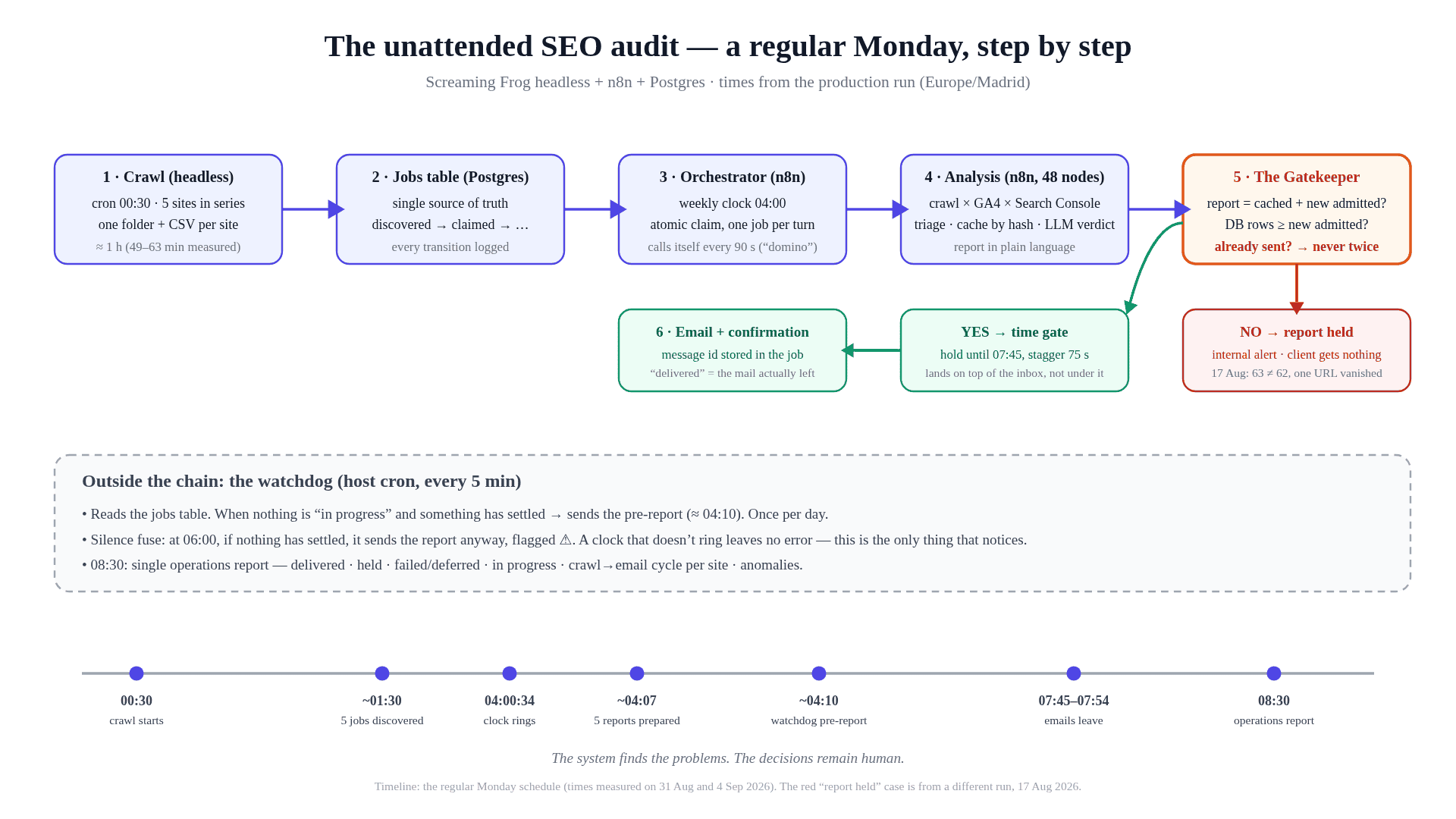
One Monday, from crawl to inbox, with the watchdog looking on from outside.
On Monday 31 August, at 04:00:34, the system did exactly what it was supposed to do: it woke up, claimed the first job and started analysing. At 04:02:05 it was dead. A number where a string was expected: 1 instead of “1”. At 06:00 the watchdog sent its report with a warning: nothing had settled. I read it at 09:30. This article is about everything that happened between those three times.
I have been doing this for thirteen years. I have been around for sixty-seven. When I decided that my clients’ technical audits had to run without me, I did not just want them to run unattended. I wanted something harder: a system that knew when the report should not go out. What follows is how it was built, where it broke under real load, and the point at which it stopped being a collection of automations and became a system I could trust.
What you need
Nothing exotic. Everything below runs on my own server — a VPS with Debian and Docker — with these parts:
- Screaming Frog SEO Spider, with a licence because command-line (headless) mode is a paid feature, and with the GA4 and Search Console integrations configured for each site.
- n8n as the orchestrator. It could be any other tool able to wake up on a schedule, run SSH and talk to a database; the design does not depend on n8n.
- PostgreSQL as the single source of truth. One capability matters in particular here: SELECT … FOR UPDATE SKIP LOCKED.
- Access to the GA4 and Search Console properties for every site being audited.
- An API key for a language model, used for per-URL analysis, and a mailbox to send the reports from.
- A cron. The operating system’s own. Nothing more.
What “unattended” actually means
The chain, as it runs every Monday on that server, has eight steps.
- A crawl with nobody in front of it. At 00:30 a cron launches Screaming Frog in headless mode against five sites, one after another, with a lock to make sure two crawls can never run at the same time. Each crawl has access to that site’s GA4 and Search Console properties and leaves a folder containing its CSV. The five sites in series take about an hour.

Every folder is a job; its name carries the exact time of the crawl.
- A table that is in charge. Every folder is registered as a job in Postgres with a status — discovered → claimed → imported → analysing → report ready → report sent — and every status change leaves an event recording who made it and when. Until August, the “truth” lived in a text file. Not any more.

The table is in charge; the report and the watchdog only read it. Client domains blurred.
- A claim that cannot collide. At 04:00 a schedule wakes the orchestrator. The first thing it does is claim a job in a single transaction: SELECT … FOR UPDATE SKIP LOCKED picks the next pending row and, in the same operation, an UPDATE marks it as claimed. Two simultaneous claims can never take the same folder. The whole idea fits in two lines:
- WITH cand AS (SELECT id FROM jobs WHERE status IN (‘discovered’,‘retry’) ORDER BY folder DESC LIMIT 1 FOR UPDATE SKIP LOCKED)
UPDATE jobs SET status = ‘claimed’, claimed_at = now() FROM cand WHERE jobs.id = cand.id RETURNING jobs.folder; - (Table and column names translated; the shape is the one running in production.)
- WITH cand AS (SELECT id FROM jobs WHERE status IN (‘discovered’,‘retry’) ORDER BY folder DESC LIMIT 1 FOR UPDATE SKIP LOCKED)
- The domino. The orchestrator processes one folder and calls itself again every 90 seconds while jobs remain, with a cap of twelve rounds. Five sites, five rounds, about seven minutes.

One clock; the rest is domino. Each run stays open until the 07:45 door, hence the three-hour-plus duration.
- The analysis. A second workflow, with 48 nodes, joins the crawl with GA4 and Search Console URL by URL and performs triage. The thresholds are choices for this installation, not laws: out go non-indexable URLs, 4xx and 5xx responses, anything with fewer than ten impressions or beyond position 50, plus a cap on new URLs per run so that no Monday can blow up the bill. Then it checks a cache. Each URL carries a fingerprint calculated from its metrics; if the fingerprint has not changed and the verdict is less than 30 days old, the stored analysis is reused and no new analysis is paid for. Whatever passes the filter goes to the language model. The final report is written in the language of the business owner, not the language of the person doing the measuring.

Left to right: cache, triage, analysis, render. Node names are real; they are just too small at this scale.
- The Gatekeeper. Before anything is sent, one node reconciles the report. Much of this article is about that node.
- The door. Reports prepared in the small hours are held and released between 07:45 and 07:54, staggered 75 seconds apart. A report sent at 04:10 wakes up buried under the night’s email. Sent just before 08:00, it sits near the top of the inbox.
- The confirmation. “Delivered” is an internal status with a deliberately narrow definition: Gmail accepted the send, returned a message identifier, and that identifier was stored on the job. It does not mean the email was read, nor that it cannot bounce later. It means the message really left the system and there is evidence that it did.
And outside the chain, looking in, is the watchdog. Every five minutes, a cron reads the table. Once nothing is in progress and something has settled, it sends a preliminary report. Once. If nothing has settled by 06:00, it sends the report anyway, this time with a ⚠️ in front. A silent Monday is the worst report of all. At 08:30 the final report arrives; that one no longer warns. It counts.
The watchdog is the only component that does not depend on the system it watches. Its entire contract fits in one crontab line:
*/5 4-8 * * 1 /opt/jobs/watchdog.sh # Mondays, 04:00–08:59: reads the table; at 06:00 warns if nothing has settled

The fuse doing its job: nothing had settled, and the system said so anyway. Translated from the original.
The Challenge
Automating a crawl is an afternoon. Automating a report is a week. What is genuinely expensive is automating the word no: building a system that can decide a report must not go out, and tell you why.
A client who receives a report with one URL fewer than it should contain may not notice. A client who receives the same report twice will. And a client who receives a report built on a half-finished crawl may make decisions based on data that does not exist. None of those three things has to happen before it becomes a problem. On 17 and 24 August the same domain was reprocessed, and only luck prevented a duplicate. That was the luck I decided to remove.
Strategy / Solution: teaching the system to say no
The Gatekeeper reconciles three things
Before an email leaves, the Gatekeeper compares:
- What the report shows with what it should show: cached URLs plus the new ones admitted by the cost cap.
- What is in the database with what was admitted for analysis: if twenty new analyses were requested, there must be twenty completed rows.
- Whether the job has already been delivered. If it has a sent timestamp, it is held even when everything else reconciles.
If anything does not add up, the job moves to “held”, I receive an internal email with the reconciliation line by line, and the client receives nothing.
There is no single barrier against duplicates. There are three, each in its proper place. First, the atomic claim: a folder can only be claimed once. Second, identity at claim time: same domain, same crawl date, same pipeline version and already delivered; the job defers itself. Third, the sent timestamp checked by the Gatekeeper.
I do not promise that anything is impossible. I promise that, for a client to receive the same report twice, all three barriers have to fail.

What it expected (63), what it found (62 and 62), why it closed the door, and what was learned a week later. Client domain and URL blurred destructively; no metadata.
The day it said no, although the problem was not what it seemed
On 17 August at 08:08, the Gatekeeper counted 63 URLs at the entrance, 62 in the report and 62 in the database. It flagged MISMATCH on two lines, identified the missing URL and did not send.
It did exactly what it was supposed to do with the information it had: faced with a difference it could not explain, it closed the door.
A week later, while investigating, we discovered that the mismatch could have been a false positive. URLs beyond the cost cap were being counted as “vanished” when in fact they had been deliberately deferred. We corrected the Gatekeeper so that it could tell the difference.
The order matters: the guardian said no, a human investigated, and the guardian learned to distinguish. That is what the decisions remain human means. It does not mean a human has to press the send button. It means a human decides what “wrong” means.
The system’s other “no”s
- Orphans. A claimed job that has not moved for three hours goes back into the queue as a retry and leaves an event behind. I paid for that one on 31 August: one job stuck for five hours.
- Fail-open, but with a net. If the database does not answer, the claim temporarily falls back to the old file-based path so that Monday is not blocked. As soon as the database comes back, the claim itself reconciles what happened during its absence before touching anything new. The Gatekeeper, which is fail-closed, continues to prevent duplicate email. Two layers; each with its own rule.
- Not yet. The 07:45 door is also a “no”: not now. Unattended does not mean “as soon as possible”. It means “when the human is going to read it”.
The next Gatekeeper
Today, the Gatekeeper checks that the report reconciles with itself. What it does not yet check is whether it also reconciles with its recipient: whether the client, site, analysis, report and email address are exactly the ones they should be before the door opens.
It is the same principle applied to delivery, and it is the next thing to build. I mention it because I do not want anyone to read into this article a guarantee that does not exist yet.
Today the reports land in my inbox as the last stop before the client; routing each one to its recipient is the next piece, and it is why the delivery Gatekeeper comes first.
The clock that didn’t ring
On Monday 31 the clock rang and the pipeline died 91 seconds later because of one character. That is a five-minute fix:
String(Number(previous.iteracion || 0) + 1) // the trigger wanted “1”; the domino was passing 1
Tuesday was worse, because it left no trace.
To test the fix, I set up a rehearsal. Through the API I added a second rule to the clock for Tuesday at 04:00. The crawl ran at 00:30: five out of five. At 04:00, nothing. No execution, no error, not a single line in any log. The watchdog did its job: at 06:00 it sent the ⚠️.
The forensics took a morning. This is what I could verify: n8n had been updated three days earlier; in that version, every time an active workflow is saved, the scheduler removes its clocks from memory and registers them again; that registration is written to the log only at debug level, so it is invisible in production; and the event log mixes two time zones without saying so — the workflow’s and the instance’s, which, if left unconfigured, is New York. That last point did not cause the failure, but it can turn a hurried reading of the logs into a false conclusion.
I read the scheduler’s code from end to end. On paper, the re-registration is correct. What I could not prove was why that added rule produced no execution: whether it had anything to do with the update, saving from the interface, or some other condition.
The next day, the three rules I added through the API rang.
All three.
I still do not know why.
And until I do, I will not declare a clock healthy just because the workflow runs by hand. The external watchdog will keep reading the table, and the 06:00 warning will remain the fuse.
What I do know is what I learned:
- The absence of errors is not health. A clock that does not ring writes nothing. The only thing that noticed was a cron outside the system, looking at a table.
- A manual run does not test the trigger. It executes the canvas, not what is published. Monday’s green manual run made me believe the clock was healthy.
- The alarm has to reach where the human is. The 06:00 ⚠️ was perfect, and it went to a mailbox I did not look at until 09:30 because I was absorbed in something else. Now the same alarm appears in the terminal whenever I open a work session, whatever the project. It is not the complete solution: as long as I am the only person who can react, the system has a single point of failure with a first name and a surname. The second channel and the second pair of eyes are the next job.
Wednesday: three clocks, five reports, no humans
To settle the doubt, on Wednesday 2 September I set three clocks through the API across the morning: 08:30, 08:45 and 09:30. Each one was there to consume whatever the crawl had left.
All three rang.
Five reports were delivered between 08:34 and 09:35. Zero held. Zero errors. Crawl-to-email cycles of between 5 and 25 minutes.
That afternoon I replayed the whole Monday, compressed: crawl at 12:00, a single clock at 15:30, the watchdog with its fuse, the door at 19:15, and the report at 20:00. Everything rang and everything went out when it should, with nobody touching anything in between.
But a compressed Monday is still a rehearsal at the wrong hours.
The proof I wanted was the real thing.
Friday: the Monday chain, at Monday’s hours
So I added one more rule to the clock: Friday 4 September at 04:00. The exact Monday schedule. The whole chain asleep.
And me asleep too.
| Madrid time | Piece | Result |
|---|---|---|
| 00:30:01 → 01:28:09 | crawl, five sites in series | 5/5 |
| 04:00:34 | the clock rings; the orchestrator claims the first job | ✅ |
| every ~90 s, four times | the domino | ✅ |
| 04:10 | watchdog’s preliminary report | 5 ready · 0 held · 0 failed, no ⚠️ |
| 06:00 | the silence fuse | did not fire |
| 07:46:15 → 07:52:30 | the door releases the five emails, staggered | ✅ |
| 08:30:01 | final report | 0 held · 0 in progress |
Five reports with the Gatekeeper open, from 2 to 76 URLs each, every one with its Gmail identifier stored on the job.
Executions in error across the whole day: zero.

A Monday in one inbox: the watchdog at 04:10, the door between 07:46 and 07:52, the count at 08:30. Client domains blurred; the two visible are my own sites.

The report window covers three days, so it counts the fifteen deliveries from Wednesday morning, Wednesday afternoon and Friday. The five “failed” jobs are Wednesday’s small-hours jobs, which I deliberately discarded so that rehearsal could start with a fresh crawl; each has its reason recorded. Translated from the original.
That was the moment I stopped having a collection of automations and started having a system.
Not when it worked.
When it failed in two different ways, told me on its own, and then completed a Monday-shaped run with no human in the loop.
The blueprint, in case you build your own
The minimum every job should store. Its own identifier; the analysis — batch — and site identifiers; the domain; the status; the pipeline version; the crawl date; the number of attempts; the Gatekeeper’s result, line by line; and the identifiers for the report and the send.
With that, any Monday can be reconstructed without relying on anyone’s memory.
Five questions before declaring green:
- Was the right job processed, and only once?
- Does the expected count match what was produced and what the database says?
- Can it be repeated without duplicating results or emails?
- Is there an observer outside the system able to detect silence?
- Can what happened be reconstructed without asking the author?
What I’d tell you if you build one
- Automate the “no” before the “yes”. The crawl and the report are the easy part. The Gatekeeper, the identity check and the fuse are what let you sleep.
- One source of truth, with events. A text file does not tell you who changed what, or when. A table with events does.
- Put a lookout outside the system. If the system is the only thing able to warn you that the system has failed, it will not warn you.
- Take the alarm to where you are. Then take it to someone else. A perfect email in a mailbox nobody reads is worth exactly nothing.
- Distrust the manual run. A run by hand tests the canvas, not the clock.
- Decide when not to send yet. The time a report arrives is part of the report.
- Let the guardian be wrong, then correct it. The false positive of 17 August was the best thing that happened to the Gatekeeper: it learned to distinguish.
The system finds the problems. The decisions remain human.
And all of this, by the way, was typed with two fingers.
Thanks for reading!
View more case studies

The Atomic Answer Framework, Localised: Winning AI Overviews Across Markets

How to Check If AI Crawlers Can Actually Reach Your Site

How to Build an AI Content Pipeline That Can’t Fabricate Its Sources