
If you work in technical SEO, you’ve probably had to analyse competitors’ robots.txt files, and you know how tedious that can be.
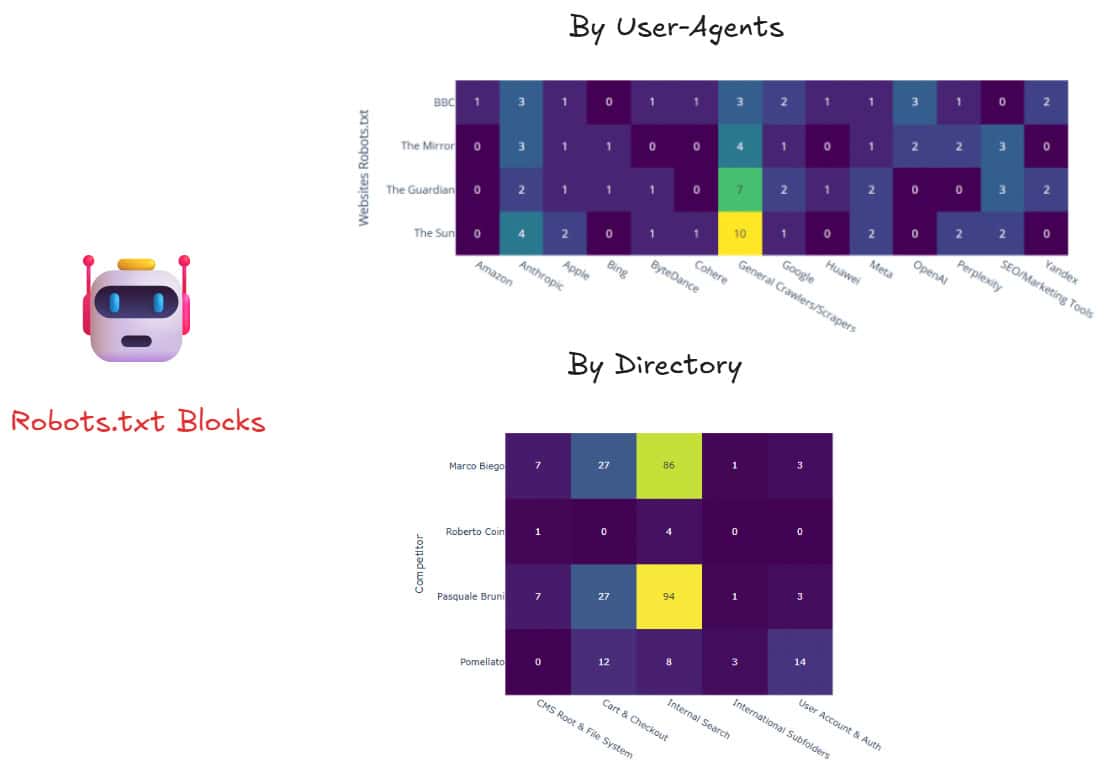
Because there are very few tools designed for this task and AI agents drain your wallets, I built my own free workflow in Python that compares robots.txt files across competitors, highlighting differences in disallowed user agents and URL directories.
Requirements & Toolkit
Advertools is a python library that will help you fetch the robots.txt files whilst Plotly will be leveraged for replicating the data visualization from the heatmaps above.
You don’t need to be a Python expert for this tutorial, but some familiarity with data pre-processing will be useful. That’s because defining labels to cluster disallowed directives can be both time- and resource-consuming.
This is mainly due to the fact that the process depends on the industry you’re analyzing as different sectors have different needs when it comes to drafting a robots.txt file.
To follow along, I highly recommend jumping on the full notebook on GitHub
Fetch Competitors Robots.txt
After installing Advertools and Plotly, the script requests the robots.txt files from a list of competitor websites and stores the output in a single Pandas dataframe for analysis.
To avoid overwhelming servers, it’s good practice to introduce a delay between requests. In this regard, a minimum time.sleep(5) is used to reduce the risk of being blocked, but some sites may still require a longer delay.

Data Pre-processing
Before comparing robots.txt files, it’s worth cleaning the dataset to remove unnecessary noise.
This step removes metadata columns that aren’t needed for the analysis and keeps only the directives we’re interested in: User-agent and Disallow. It then uses RegEx to strip special characters and standardise the directive values, making them easier to compare across websites.
The result is a cleaner dataset focused on blocked user agents and URL paths, ready for analysis and visualisation.

The next step is to split the main dataset into:
- User-agents table
- Directives table

User-Agent: Rule-based Classification
Using the user-agent dataframe as an example, the script groups individual crawlers into broader categories such as Google, OpenAI, Anthropic, Meta, Bing, Apple, and Perplexity, while also identifying SEO tools and generic scrapers.
This simplifies the analysis, making it easier to compare how competitors manage access for search engines, AI crawlers, and third-party bots without manually reviewing hundreds of individual user-agent names.

Next, we visualise the distribution of blocked user-agents across competitors’ robots.txt files.
By aggregating crawler categories and plotting them in a heatmap, it becomes much easier to spot patterns in how publishers manage access for search engines, AI crawlers, SEO tools, and other automated agents.

Disallow Directives: Rule-based Classification
With the disallow directive table is literally a rinse-and-repeat process.
However, it can be more challenging due to the volume of rules you might stumble across on robots.txt files.
To begin, we’ll rewind to the original robots_df dataframe and prepare the disallow directives for analysis.

If the prospect of clustering loads of subfolders seems a bit of an overkill, you can always ask Claude to help you out. Here’s how.
- Export the Directive Table in XLSX
- Copy the list of blocked directives (“content” header)

- Paste in Claude with the following prompt:
Use one-hot encoding to apply a rule-based classification to label the following list of terms.
Once you found out where these terms belong, please translate them into python to compute the clustering.
Please, make sure the output is concatenated as an additional header to the existing “directive” dataframe
[content_list]
Now, you can decide whether to add an extra cell in the Google Colab notebook to run the suggested script or keep Claude’s rule-based classification.
Be very cautious with the latter; double-check that the classification of disallowed directives actually aligns with your needs.

You are now good to plot the disallow directive groups from the pool of competitor websites.

With a couple of tweaks here and there, you can secure yourself a reliable workflow to streamline a robots.txt competitive analysis.
A few Python Lines for the Perfect Robots.txt Automation Workflow
Robots.txt analysis doesn’t have to be a manual, time-consuming process.
And it’s also free.
You don’t have to shell out your tokens after MCPs or AI agents if you know where to source your stash.
With Advertools handling the fetching, Pandas for preprocessing, and Plotly for visualisation, you have a repeatable workflow that scales across as many competitors as you need.
The rule-based classification is the only part that requires domain judgment, but even that can be streamlined with a little help from LLMs.
Feel free to fork the notebook, adapt the crawler categories and directive labels to your industry, and you’ll have a competitive audit ready in minutes.
Thanks for reading!

View more case studies

The Atomic Answer Framework, Localised: Winning AI Overviews Across Markets

How to Check If AI Crawlers Can Actually Reach Your Site

How to build an SEO audit that runs itself (and knows when not to send the report)